
Bitbucket secure-coding lessons
RansomLeak can comment on a Bitbucket Cloud pull request with a link to a short secure-coding lesson when a scanner reports a weakness on it. It is free, needs no RansomLeak account and is not part of your RansomLeak organization’s settings. It works in any Bitbucket Cloud workspace that uses Bitbucket Pipelines.
There are two parts. The pipe is all most teams need. The RansomLeak app is an optional extra.
| Pipe | Pipe with the app | |
|---|---|---|
| Reads | A SARIF file from your scanner | The same SARIF file |
| Cost | Free | Free |
| Lesson comment | Needs a repository access token, otherwise report only | Posted as RansomLeak, no token |
| Ticks a finished lesson | On the next pipeline run | Within seconds |
| Code Insights report | Yes, never failing | Yes, never failing |
| Needs a workspace admin | No | Yes, once |
The pipe
Section titled “The pipe”Add the pipe after the step that runs your scanner and writes SARIF. The step needs oidc: true, so RansomLeak can tell which workspace and repository the request comes from.
pipelines: pull-requests: '**': - step: name: Scan and learn oidc: true script: # ... your scanner writes results.sarif ... - pipe: docker://ghcr.io/ransomleak/secure-coding-pipe:1 variables: SARIF: results.sarif BITBUCKET_ACCESS_TOKEN: $RANSOMLEAK_BB_TOKEN # optionalThe pipe works with CodeQL, Semgrep, Trivy, Gitleaks and other tools whose rules carry a CWE, a CVE or a GHSA, and with secrets scanners. SARIF accepts a path or a glob such as reports/**/*.sarif, up to 50 MB in total. It runs only in pull request pipelines. Other pipelines skip it.
You don’t sign up. The pipe signs in to RansomLeak with the step’s OIDC token. If your pipe container does not receive BITBUCKET_STEP_OIDC_TOKEN, pass it explicitly with OIDC_TOKEN: $BITBUCKET_STEP_OIDC_TOKEN.
When the scanner flags a type of issue we have a lesson for, the pipe writes a Code Insights report on the commit with the lesson links. With a token it also adds one comment to the pull request and updates that same comment on later runs. The comment lists up to five lessons, one for each distinct issue type, each taking 5-10 minutes.
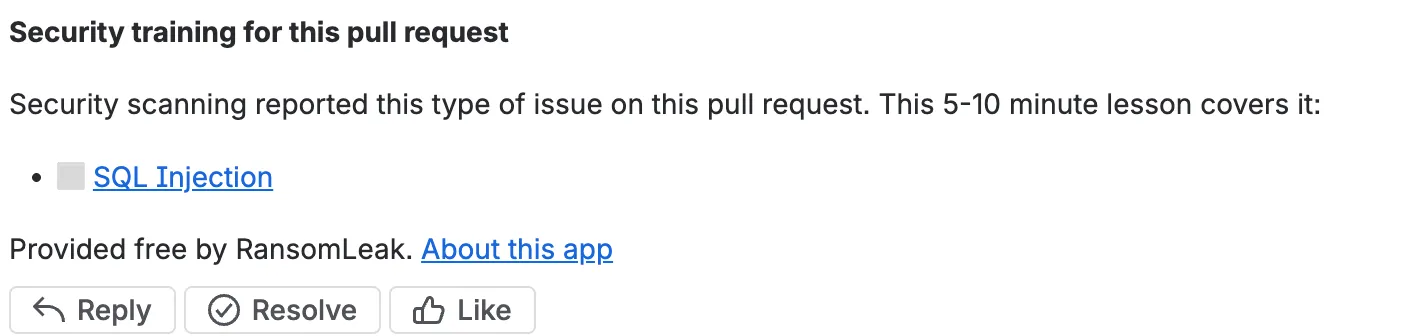
The comment reflects what your scanner reports, so run it on changed files or with a baseline for less noise. When a SARIF result has a baselineState, only new and updated results count.
Let the pipe comment (optional)
Section titled “Let the pipe comment (optional)”To get the comment, give the pipe a repository access token:
- In the repository, open Repository settings, then Access tokens.
- Create a token with the Pull requests: Write and Repositories: Read permissions.
- In Repository settings, then Repository variables, add it as a secured variable named
RANSOMLEAK_BB_TOKEN.
Without the token, the pipe still publishes the Code Insights report with the lesson counts and an Open lesson link for each lesson, and prints a note. The report appears on the pull request under Reports. Installing the app is the other way to get a comment, and needs no token.
When someone finishes a lesson, the tick appears on the next pipeline run for that pull request, for example the next push. Without the app, nothing is written to the pull request between runs.
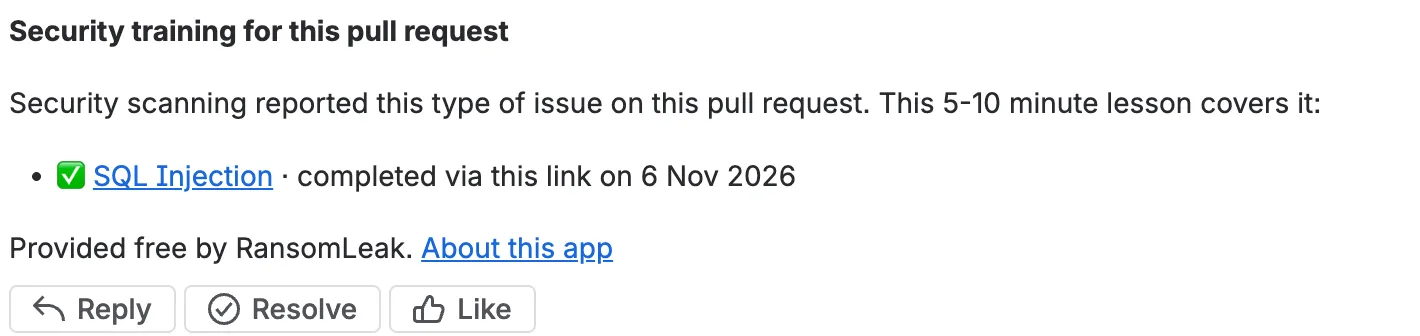
The pipe never fails your build. If RansomLeak can’t be reached, the token is missing a permission, or the SARIF file is missing or invalid, it prints a warning and carries on.
Use SonarQube instead of a SARIF file
Section titled “Use SonarQube instead of a SARIF file”If SonarQube already analyses your pull requests, the pipe can read its security findings instead of a SARIF file. Set SONAR_HOST_URL and leave SARIF out. Use exactly one source: with both or neither, the pipe prints a warning and does nothing.
- step: name: Scan and learn oidc: true script: # run the SonarQube scan for the pull request first, in the same step - pipe: docker://ghcr.io/ransomleak/secure-coding-pipe:1 variables: SONAR_HOST_URL: https://sonarcloud.io SONAR_ORGANIZATION: my-workspace SONAR_PROJECT_KEY: my-workspace_my-repo SONAR_TOKEN: $SONAR_READ_TOKEN BITBUCKET_ACCESS_TOKEN: $RANSOMLEAK_BB_TOKEN # optional| Variable | Notes |
|---|---|
SONAR_HOST_URL |
Your SonarQube Server URL, or https://sonarcloud.io for SonarQube Cloud. |
SONAR_PROJECT_KEY |
The Sonar project key. |
SONAR_ORGANIZATION |
SonarQube Cloud only. |
SONAR_TOKEN |
Needs Browse permission on the project. Store it as a secured variable. Optional for public SonarQube Cloud projects. |
SONAR_INCLUDE_HOTSPOTS |
Default false. Set true to also use HIGH and MEDIUM security hotspots still to review. |
SONAR_WAIT_TIMEOUT |
Seconds to wait for Sonar’s analysis of the pipeline’s commit. Default 300. |
- When the scan left a
report-task.txtin the same step, the pipe waits for that analysis. Otherwise, on SonarQube Cloud it waits for an analysis ofBITBUCKET_COMMIT, and on Server it reads the latest analysis. - It reads the open vulnerabilities and each rule’s CWE ids. Findings without a CWE get no lesson, except rules with only an OWASP tag for A06 and A10.
- SonarQube Server needs Developer Edition or above. Community Build does not analyse pull requests, so use
SARIFwith another scanner there. - The Sonar token is sent only to your Sonar host, never to RansomLeak. Only the scanner name (
SonarQube), CWE ids and OWASP categories go to RansomLeak. - The pipe never fails your build. If Sonar can’t be read, it prints a warning and carries on.
The RansomLeak app (optional)
Section titled “The RansomLeak app (optional)”The app posts the lesson comment as RansomLeak, ticks lessons as soon as they are finished, and keeps the Code Insights report current. It needs no access token.
A workspace admin installs it once for the whole workspace, from the install link. It asks for read and write access to pull requests and repositories, and nothing else.
The app is live. Install the RansomLeak app for Bitbucket.
Once the app is installed, the pipe asks RansomLeak who should post. The app posts and the pipe only writes the report. If the pipe already posted a comment on that pull request, the app starts its own comment with every lesson and tick carried over, and the pipe’s earlier comment is replaced by a one-line pointer to it. One lesson comment stays active.
If the app is removed from the workspace, the next pipe run posts the comment again with the token, and finished lessons stay ticked. To stop using the app, uninstall it from the workspace settings.
Pull requests from forks
Section titled “Pull requests from forks”Pull requests from forks get the Code Insights report only. No comment is posted, with or without the app.
What’s covered
Section titled “What’s covered”- SQL injection
- Cross-site scripting (XSS)
- Path traversal
- Command injection
- Server-side request forgery (SSRF)
- Hard-coded secrets
- XML external entities (XXE)
- Open redirect
- Cross-site request forgery (CSRF)
- Vulnerable dependencies
Deserialization and weak cryptography have no lesson yet.
A finding matches on its CWE. Findings from secrets scanners and dependency advisories match on the scanner type. OWASP categories and broad parent CWEs such as CWE-200 are not used, because they don’t point to one specific lesson.
Fixing the code does not remove the lesson from the comment.
What data is sent
Section titled “What data is sent”The pipe sends only identifiers: the scanner name, the CWE ids of the rules that produced a result, whether a rule is a CVE or GHSA advisory, the pull request number and the commit hash. The workspace, repository and step identifiers come from the signed OIDC token. No source code, file names, line numbers, messages, snippets or secrets leave the runner.
RansomLeak keeps no per-developer record. It stores:
- With the app installed, one install record per workspace: the install id, the workspace UUID, the app’s web trigger URL and a relay secret that we generate and store encrypted. No personal data. Uninstalling the app deletes it.
- For each finished lesson, one completion mark per workspace, repository, pull request and lesson, holding only ids and the time of the first completion. It expires after 30 days.
We store no names, emails or Bitbucket credentials. Your access token stays in your pipeline and is sent only to Bitbucket. See the privacy policy.
Completion is not verified
Section titled “Completion is not verified”The lesson link belongs to the pull request, not to a person. Anyone who can open the pull request can open the link and mark the lesson finished.
A tick means the lesson was completed via that link. Use it as a nudge, not as proof of who did the training.
Troubleshooting
Section titled “Troubleshooting”| What you see | What to check |
|---|---|
| Warning about a missing OIDC token | The step needs oidc: true. If it is set, pass OIDC_TOKEN: $BITBUCKET_STEP_OIDC_TOKEN to the pipe. |
| No comment, only a report | No BITBUCKET_ACCESS_TOKEN was set and the app is not installed, or the pull request is from a fork. |
| Warning about 401 or 403 from Bitbucket | The token lacks Pull requests: Write or Repositories: Read, or it has expired. The warning names the permission. |
| Warning about 429 | Bitbucket rate-limited the request. The comment is skipped this run and returns on the next one. |
| The pipe says it is skipping | It runs only in pull request pipelines. Put it under pipelines: pull-requests:. |
| Warning about the SARIF file | The path matches nothing, the file is empty or invalid, or it is over 50 MB. |
| No lessons at all | None of the findings maps to a lesson. Check that your scanner’s rules carry a CWE, CVE or GHSA. |
| No report | The pipe could not reach the Pipelines proxy that writes Code Insights reports. Check the step log for the warning. |
Limits
Section titled “Limits”- Lessons are in English.
- Bitbucket Cloud only. Bitbucket Data Center is not supported.
- The report and comment are written on the pull request’s source commit.
- A lesson shows only when a scanner’s finding maps to one. Findings with no matching lesson get no comment, including findings with only an OWASP category.