
Vishing drills
A vishing drill is a simulated phone call. A synthetic voice impersonates IT, a bank or an executive, and the learner picks what to say at each step.
Vishing drills are on the Vishing Drills tab under Content Management → Microlearning. You need Manage Vishing Drills to create or edit them.
What learners experience
Section titled “What learners experience”- Scene: the setup, then Wait for the call.
- The call: the phone rings. After Accept, the caller speaks and the learner chooses a reply at each decision point.
- Transcript review: they mark suspicious parts of the call.
- Reveal: red flags found and missed, plus a recap of each reply (Good call, Risky or Unsafe).
- Response: the right way to verify and report.
- Knowledge Check: the quiz.
Create a vishing drill
Section titled “Create a vishing drill”Click Create Drill, enter a Drill Name and Choose Template: Fake IT Helpdesk Call, Bank “Fraud Team” Call, Executive Payment Request, Payroll “Verification” Call, or Custom Template.
Then edit:
- Caller Identity: Caller Name, Caller ID, Org / Role (optional) and Caller Voice (Male, Female or Neutral).
- Scene Setup: Scene Title and Scene Description.
- Call Script: each caller line and each reply option, with a rating (Correct, Risky or Wrong) and the Feedback (shown in reveal). The structure comes from the template.
- Configure Red Flags: Spoofed Caller ID, Unknown / Unexpected Number, Manufactured Urgency, Claimed Authority, Asks for a Code or Password, Pushes a Payment / Transfer, Demand for Secrecy and Resists You Calling Back.
- Quiz Questions.
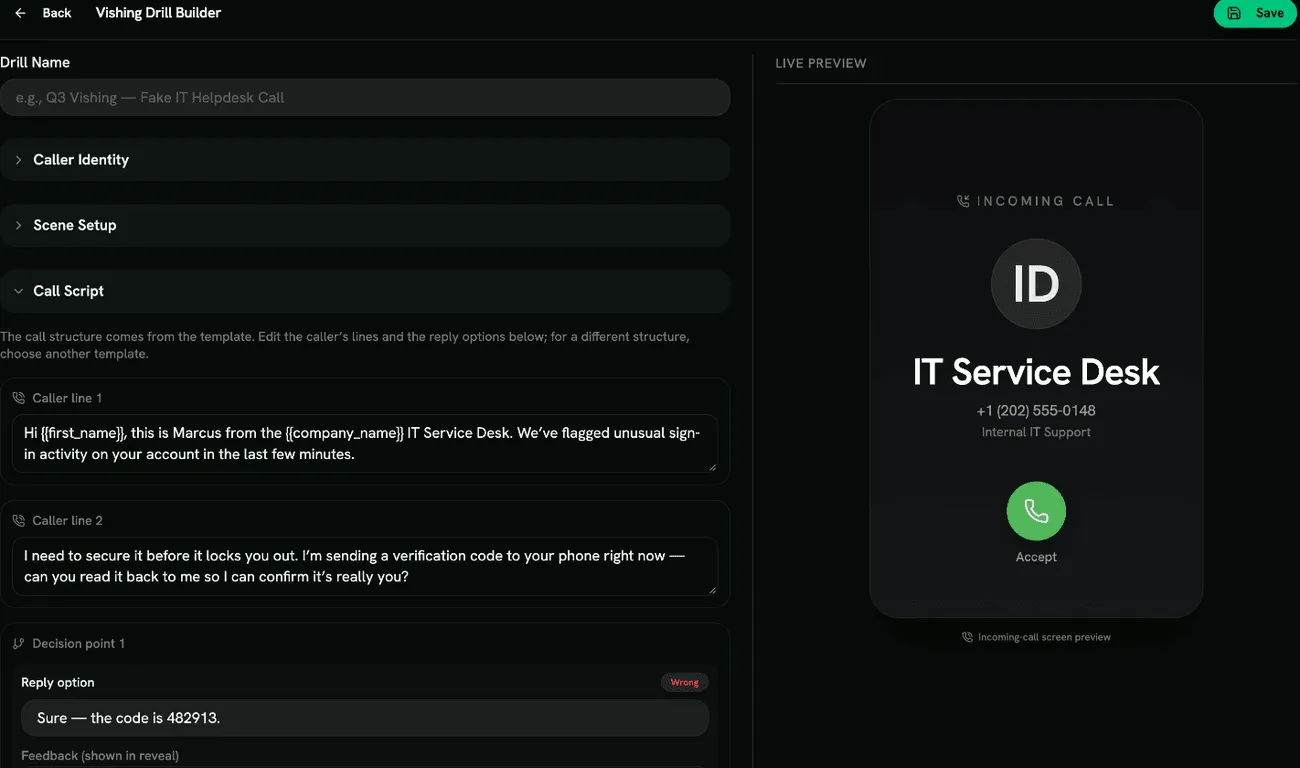
The caller’s audio is generated after you save. Preview the drill to hear it.
Scoring
Section titled “Scoring”Each reply rated Correct earns a point; red flags, the response and the quiz are scored as in other drills. See Scoring.
- Caller ID can be faked cheaply. Build at least one drill where the number looks genuine.
- Teach one simple rule: hang up and call back on a number you already know.