
Smishing drills
A smishing drill shows a simulated phone with a Messages app. The learner finds the suspicious text and inspects the sender, link and wording. No real text messages are sent.
Smishing drills are on the Smishing Drills tab under Content Management → Microlearning. You need Manage Smishing Drills to create or edit them.
What learners experience
Section titled “What learners experience”- Inbox: they look through their texts and pick the suspicious one.
- Inspection: they tap the sender, the link or the message and mark what looks wrong.
- Reveal: they see the red flags they found, missed or marked wrongly.
- Response: they choose the right way to react.
- Knowledge Check: the quiz.
Create a smishing drill
Section titled “Create a smishing drill”Click Create Drill, enter a Drill Name and Choose Template: Package Delivery Fee, Bank Fraud Alert, Verification Code Request, Executive Gift Card Request, HR Payroll Update, Prize Notification, or Custom Template.
Under Customize Message:
- Sender (number or name), for example a phone number or a name like
ACME-BANK. - Message Text. Use
{{first_name}}and{{company_name}}to personalise it. - Link Text (what the message shows) and Actual Link URL (where it really goes).
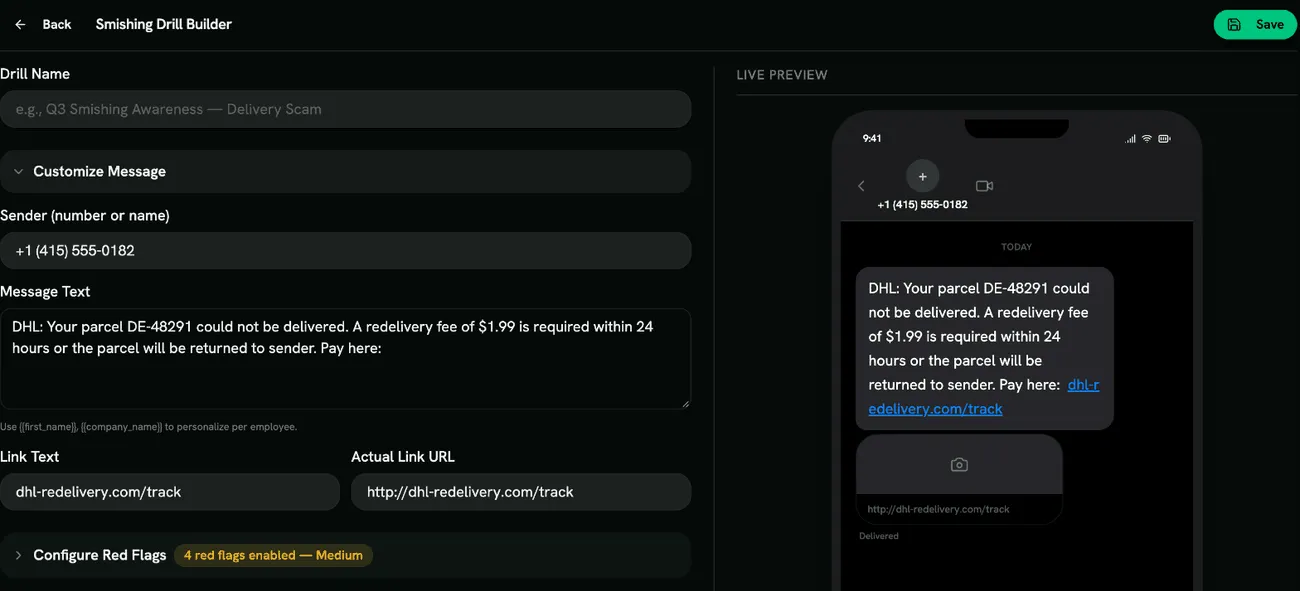
Configure Red Flags from the Sender, Links and Content groups, for example Unknown Number, Spoofed Sender Name, Shortened Link, Unusual Domain Ending, Urgency / Deadline and Asks for a Code or Password. Link flags need a link in the message.
Choose the Phone Skin (iPhone or Android), add Quiz Questions, then Preview Full Drill and Save.
Scoring
Section titled “Scoring”Scored like other drills: a point for each red flag found, the correct response and each correct quiz answer, minus wrongly marked flags. See Scoring.
- A sender name like YourBank proves nothing: anyone can set it. Spoofed Sender Name is a good flag to teach early.
- Payment and gift-card requests by text work well for finance and executive assistants.