
QR phishing drills
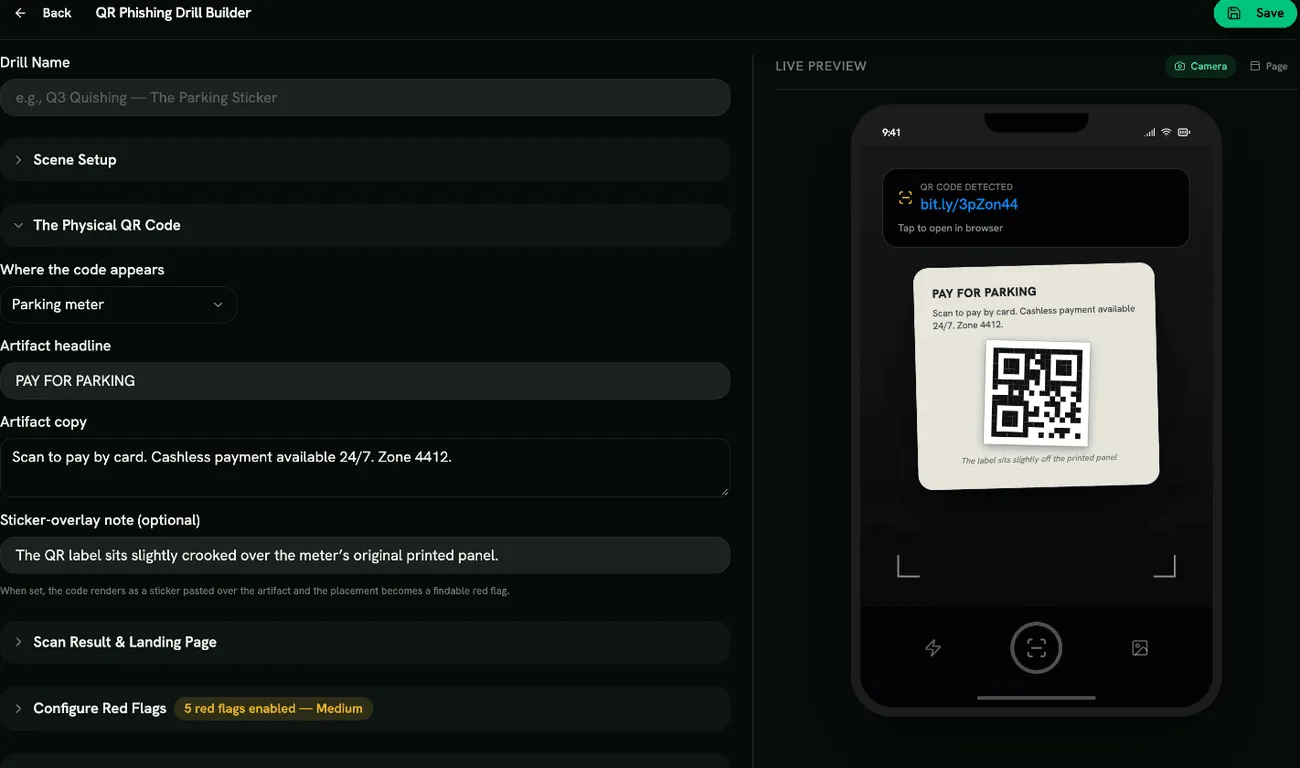
A QR phishing (quishing) drill shows a QR code on a poster, parking meter, door slip or table tent. The learner scans it on a simulated phone, sees the decoded link and the page it opens, and looks for what’s wrong.
QR phishing drills are on the QR Phishing Drills tab under Content Management → Microlearning. You need Manage QR Phishing Drills to create or edit them.
What learners experience
Section titled “What learners experience”- Scene: where they found the code, then Take out your phone.
- Scan: the camera frames the code; scanning shows the decoded link, and opening it loads the page.
- Inspection: they mark suspicious parts of the placement, the scan preview and the page.
- Reveal: red flags found and missed, with explanations.
- Response: close the page, take a photo and report it.
- Knowledge Check: the quiz.
The page’s form can’t be filled in: it’s a simulation.
Create a QR phishing drill
Section titled “Create a QR phishing drill”Click Create Drill, enter a Drill Name and Choose Template: Pay-by-QR Parking Sticker, Benefits Re-enrollment Poster, Missed-Delivery Door Slip, Restaurant “Scan to Pay” Table Tent, or Custom Template.
Then edit:
- Scene Setup: Scene Title and Scene Description.
- The Physical QR Code: Where the code appears (Poster, Parking meter, Door slip or Table tent), Artifact headline, Artifact copy and an optional Sticker-overlay note. With a note, the code appears as a sticker pasted over the original print, and that becomes a red flag to find.
- Scan Result & Landing Page: Scan preview URL (what the phone shows after scanning), Landing page URL, Landing headline, Landing body, an optional Urgency banner, Form fields (one per line) and the Submit button label.
- Configure Red Flags from Appearance, Content and URLs, for example Sticker Over the Original, Shortened Scan URL, Lookalike Domain, No HTTPS, Payment via Scanned Code and Credential Ask.
- Phone Skin: iPhone or Android.
- Quiz Questions.
Scoring
Section titled “Scoring”Scored like other drills. See Scoring.
- The scan preview is the only moment the learner can check the link before the page opens. A shortened link there is worth teaching.
- Some flags, like Generic Greeting or Long Tracking Parameters, also appear on genuine notices. Use them in harder drills.