
For managers
Anyone with direct reports sees a Team Management section in the menu. A person’s manager is set on their user profile, or comes from your identity provider or HR system.
My Subordinates
Section titled “My Subordinates”Campaign progress for each direct report:
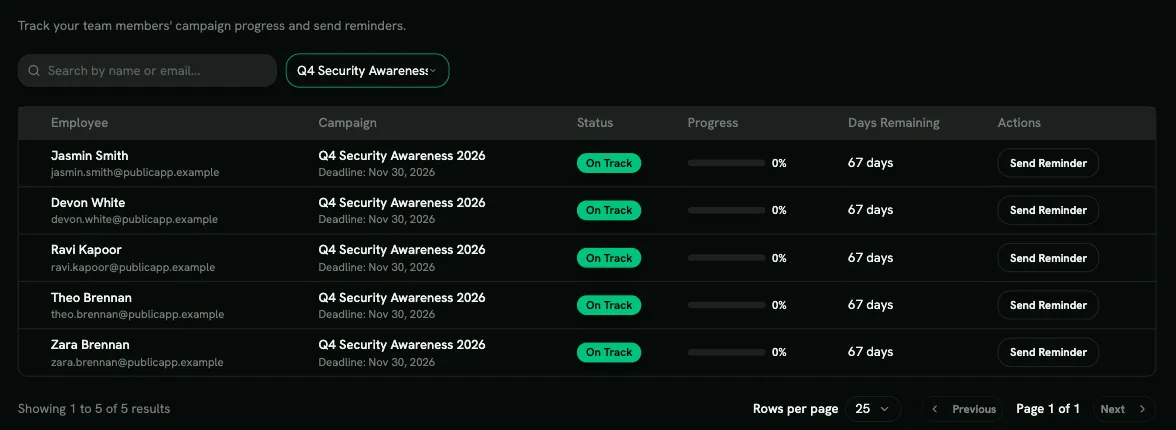
| Column | Meaning |
|---|---|
| Status | On Track, At Risk, Overdue, Completed or Not Enrolled |
| Progress | How much of the campaign they’ve completed |
| Days Remaining | Time left before the deadline |
Use Send Reminder to nudge someone by email. Search by name or email, or filter by campaign.
Learning Path Deadlines
Section titled “Learning Path Deadlines”Every learning path assigned to your direct reports, most urgent first.
- Tabs: Open (default), Overdue, Due soon (the next 3 days), Completed and All, each with a count.
- Search by name, email or path.
- Due shows the date and how long is left, or how long it’s been overdue.
- Learning path notes whether it was assigned by a team rule (via team …) or by hand.
Click Remind to email the person a reminder from you. The button is hidden when your organization has turned off learning path emails. You can remind each person about each path once every 24 hours. People who haven’t accepted their invitation yet aren’t listed.
The overdue email you receive for a direct report links straight to the Overdue tab.
Subordinate Reports
Section titled “Subordinate Reports”Generate a CSV or PDF report of your direct reports’ training across campaigns. Past reports stay under Report History.
Enrollment Requests
Section titled “Enrollment Requests”When self-enrollment is off, learners who want to join a learning path send a request to their manager. Approve or reject it here. See Self-enrollment.