
Social Media drills
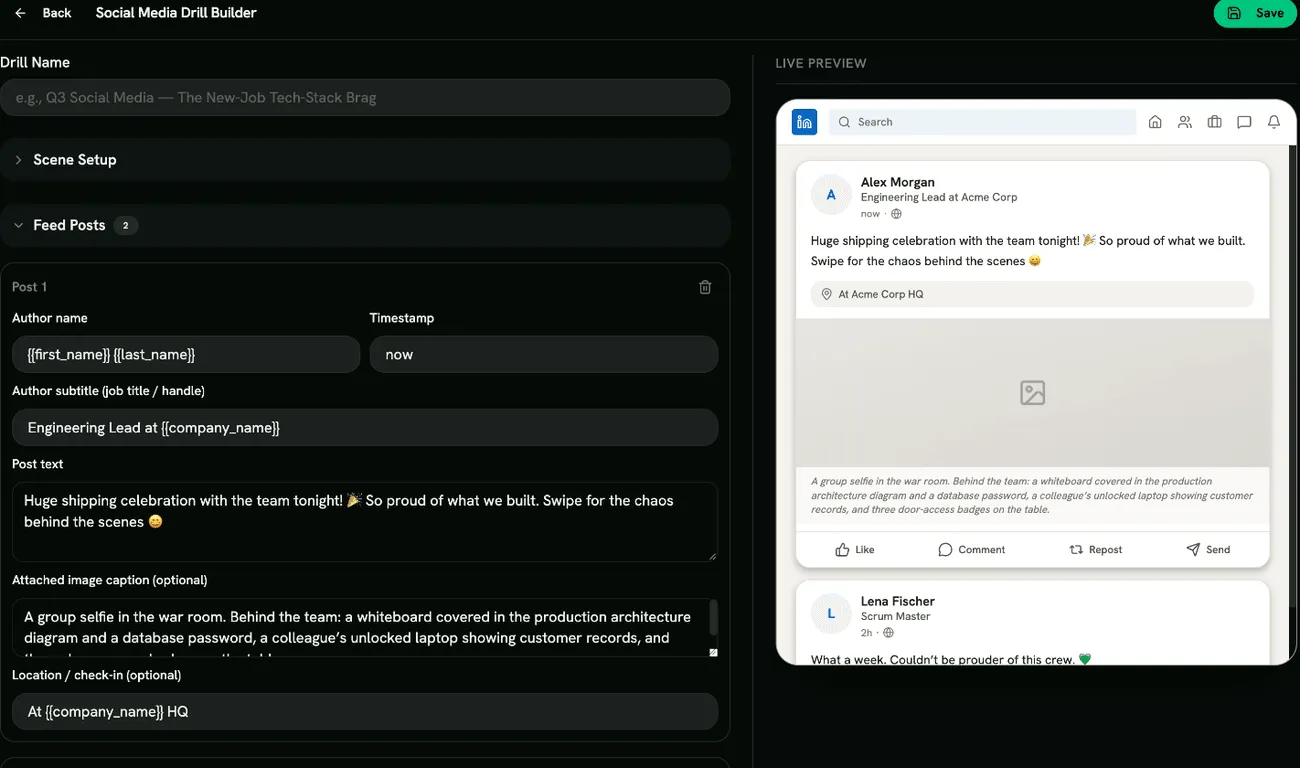
A Social Media drill turns things around: instead of spotting an incoming attack, the learner looks at their own feed, a post they’re about to publish, a photo, a connection request, and marks what an attacker could use. Attackers gather these details (tools in use, who reports to whom, when people travel) to write convincing targeted phishing. The feed is a simulation.
Social Media drills are on the Social Media Drills tab under Content Management → Microlearning. You need Manage Social Media Drills.
What learners experience
Section titled “What learners experience”- Scene: a short setup explains what they’re about to post or act on.
- Inspection: a LinkedIn- or X-style feed. They tap every post, photo, location tag or connection request that gives too much away.
- Reveal: the oversharing they found and missed, with explanations.
- Response: don’t post it, or decline and verify, and why small details add up.
- Quiz.
Building a Social Media drill
Section titled “Building a Social Media drill”Click Create Drill and pick a template: New Job — The Tech-Stack Brag, Vacation Countdown, The Whiteboard Selfie, The Fake Recruiter Request or Custom Template. Then fill in:
- Scene Setup: Drill Name, Scene Title and Scene Description.
- Feed Posts: Add post, then for each: Author name, Author subtitle (job title / handle), Timestamp, Post text, an optional Attached image caption (describe what’s visible in the photo, such as a badge or an unlocked screen) and an optional Location / check-in.
- Connection Requests: Add request, then for each: Requester name, Job title, Company, Intro message and Mutual connections.
- Feed Skin: LinkedIn or X (Twitter).
Red flags
Section titled “Red flags”Under Configure Red Flags, choose from Internal Tech Stack Named, Travel / Out-of-Office Tell, Org-Chart Oversharing, Sensitive Detail in Photo, Precise Location Check-In and Fake Recruiter Request. Photo, location and recruiter flags need a post with an image, a check-in or a connection request first.
Scoring
Section titled “Scoring”Each red flag found, the correct response and each correct quiz answer earns a point. Marking something harmless counts against the score. The drill is passed when the score reaches your Quiz Completion Threshold.
- Use
{{first_name}},{{last_name}}and{{company_name}}so the feed looks like the learner’s own. - New starters are a good audience: people often announce a new job with details of their team and tools.