
Tracking progress
For one path: the Participants tab
Section titled “For one path: the Participants tab”Open the path from Content Management → Learning Paths and go to Participants. For each person you’ll see:
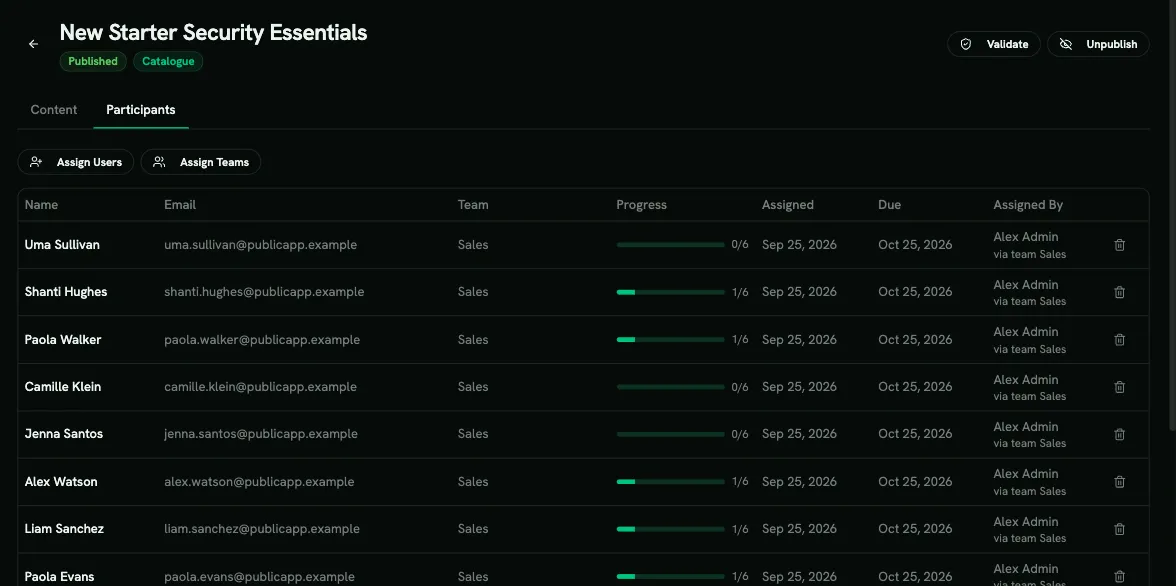
| Column | Meaning |
|---|---|
| Name, Email, Team | Who they are |
| Progress | How much of the path they’ve completed |
| Assigned | When they were enrolled |
| Assigned By | Who enrolled them, or Self-enrolled |
Across paths: the Compliance page
Section titled “Across paths: the Compliance page”Analytics → Compliance shows training status for audits and compliance reviews.
- The By learning path table lists each system path with its completion across your organization. Turn on Include non-system paths to add your own paths.
- Download a roster CSV for any path to get per-person status for an auditor.
- Per-user PDF evidence and a tenant-wide CSV are also available here.
If you use Vanta, the same data is sent there automatically. See Vanta.
For campaigns
Section titled “For campaigns”When a path is delivered through a campaign, the campaign’s own pages show progress against the deadline, including who is overdue. Managers can follow their direct reports under Team Management → My Subordinates.
Troubleshooting
Section titled “Troubleshooting”Someone isn’t in the Participants list after I assigned them. They probably have no licence. Unlicensed people are skipped during assignment, and AppSec paths always need an AppSec licence. Check User Management → Users.
The path was marked complete the moment I assigned it. The person had already completed every required step, for example on their own or before being unassigned. Completions carry over for direct assignments. Campaigns are different: they count only work done during the campaign, unless a completion recognition window is set.
Learners can go through the steps in any order. The step order in the builder doesn’t enforce anything. Add prerequisites.
I edited the path but a campaign still shows the old steps. Campaigns keep a frozen copy of the path. Remove the path from the campaign and add it again. You can do this only while no participant has started.
I can’t publish, unpublish or delete a path.
- Publishing fails when the path has no steps, a duplicate item, or a prerequisite loop. Click Validate to see why.
- Unpublishing and deleting are blocked while the path is used in an active campaign. Deleting also needs every participant unassigned first.
- System paths can’t be changed at all. Clone them instead.
Learners can’t see the path in the catalogue. The path must be published and its Catalogue switch must be on.