Risk automation
Risk automation turns the Human Risk Score into action. When a person crosses a threshold you set, RansomLeak can enroll them in a learning path or alert their manager.
Find it under Human Risk → Automation. It needs the Human Risk Score to be on. If it is off, the page shows Human Risk Score is off; turn it on under Scoring settings on the Risk Score page.
Permissions
Section titled “Permissions”| Permission | What it allows |
|---|---|
| Manage Risk Automation | Change the mode, create and edit rules, run the preview |
| Override Risk Automation | Dismiss a stuck enrollment |
| Viewing risk dashboards | See the Action log and Stuck people |
Automation mode
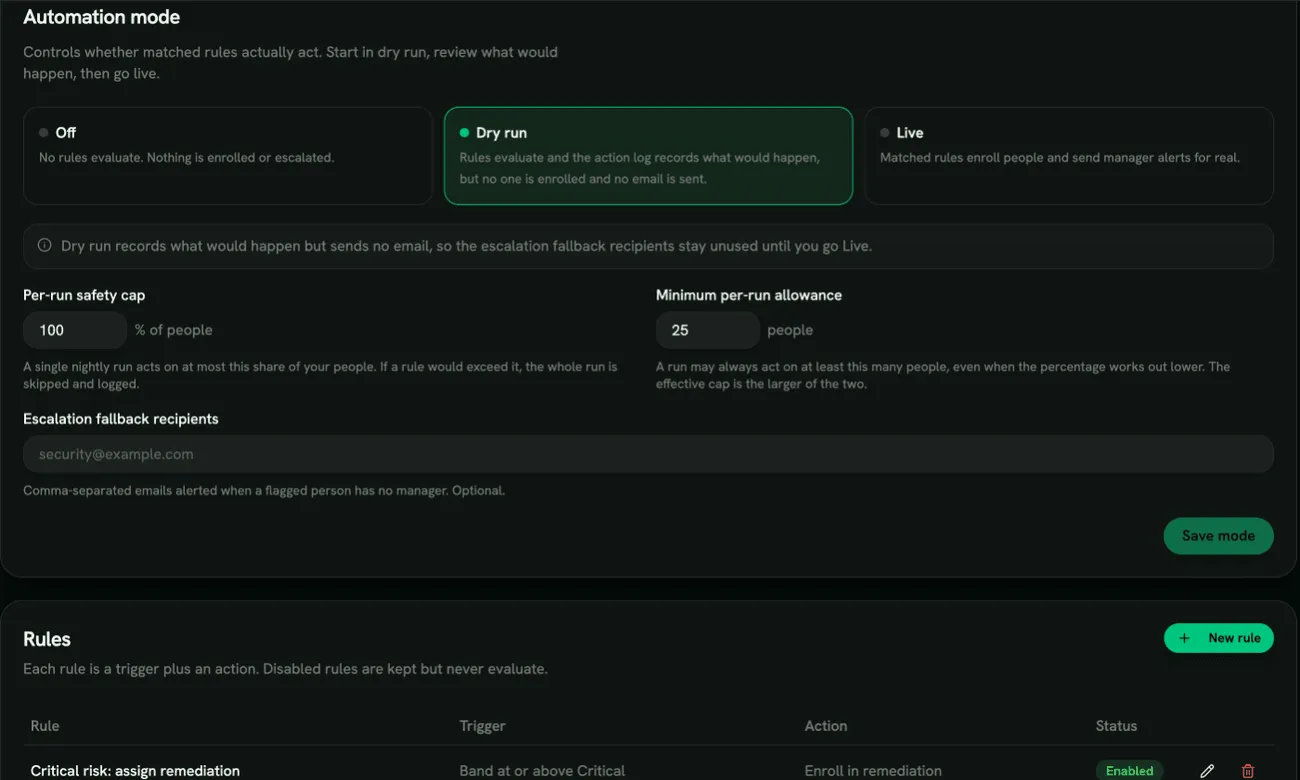
Section titled “Automation mode”Under Automation mode, choose one:
- Off: no rules evaluate. Nothing is enrolled or escalated. This is the default.
- Dry run: rules evaluate and the Action log records what would happen, but no one is enrolled and no email is sent.
- Live: matched rules enroll people and send manager alerts for real.
Start in Dry run, review the log for a few days, then switch to Live.
On the same card:
- Per-run safety cap (10% of people by default) and Minimum per-run allowance (25 people by default). One nightly run acts on at most the larger of the two. If a rule would go over it, the whole run is skipped and logged as Run skipped (safety cap), so a badly set rule can’t enroll everyone at once.
- Escalation fallback recipients: comma-separated email addresses that get manager alerts for people who have no manager. Optional.
Click Save mode.
Each rule is a trigger plus an action. Click New rule and fill in:
Basics
- Rule name, and Rule enabled. A disabled rule is kept but never evaluates.
Trigger (Trigger on)
- Risk band: Band at or above a band, for example High or Critical.
- Risk score: Score at or above a number. It must be above 40.
- Assessment topic gap: acts when a topic becomes a gap in someone’s baseline assessment. Pick a Topic or Any topic. These rules always enroll people in that topic’s own training path.
- Minimum confidence: skip people whose score has low confidence, unless the Confidence bypass factor is present. Hard fail (credentials, attachment, OAuth, BEC reply) catches someone who submitted credentials in their first simulation.
- Sustained days: how many days the threshold must hold before acting.
Action (When triggered)
- Enroll in a learning path: choose the Learning path (the security awareness refresher by default), a Completion deadline (1-365 days, 14 by default) and a Grace period (0-90 days).
- Alert the manager: the manager gets one daily digest of their direct reports who are currently at risk. This needs Sustained days of 2 or more.
Guards
- Cooldown: don’t act on the same person with the same rule again within this many days.
- Max actions per period and Period: an optional cap on how often the rule acts on one person.
New organizations start with one example rule: enroll people at Critical in the security awareness refresher, with a 14-day deadline. It does nothing until you switch the mode to Dry run or Live.
Deleting a rule stops it evaluating. People it already enrolled keep their assignments.
When it runs
Section titled “When it runs”Rules are checked once a night, after scores are recalculated. Manager digests are sent once a day, in Live mode only, and someone who drops back below the threshold simply disappears from the next digest.
Preview, log and stuck people
Section titled “Preview, log and stuck people”- Dry-run preview: click Run preview to see how many people each enabled rule matches right now. No one is enrolled.
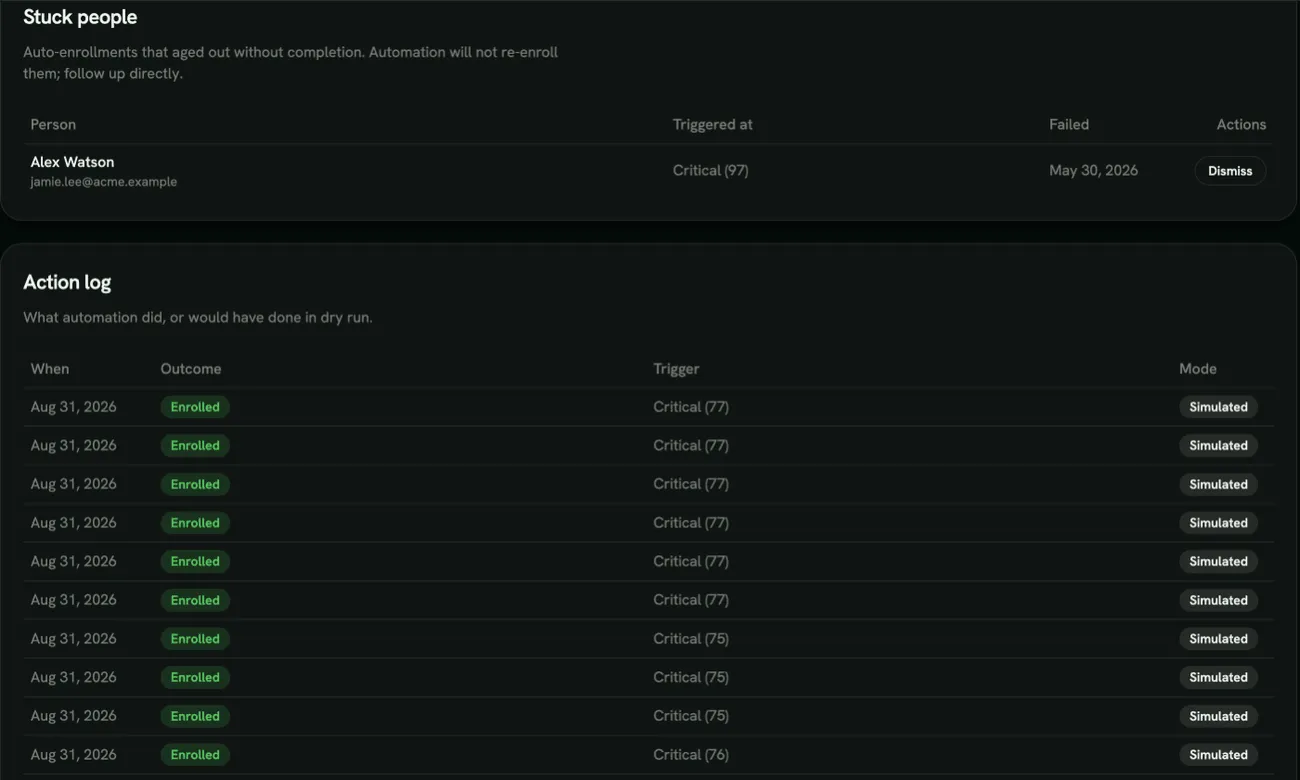
- Action log: everything automation did (Applied) or would have done in dry run (Simulated), with the outcome, for example Enrolled, Manager alerted, Skipped (cooldown) or Skipped (already enrolled).
- Stuck people: automatic enrollments that passed their deadline and grace period without being completed. Automation won’t enroll these people again, so follow up with them directly. Dismiss clears the flag so automation can consider them again; it doesn’t remove their training.