
AI Chat drills
An AI Chat drill recreates a common mistake: someone under deadline opens a public AI chatbot, and the quickest way to get help is to paste in confidential data. The learner chats with a scripted assistant and decides at each step what to share. No real AI service is involved.
AI Chat drills are on the AI Chat Drills tab under Content Management → Microlearning. You need Manage AI Chat Drills.
What learners experience
Section titled “What learners experience”- Scene: a short setup gives them a task and a deadline.
- Conversation: the assistant offers help, and at each decision point they choose what to send: a risky shortcut, a partly masked version, or a safe version with placeholders. Risky choices lead to bigger requests.
- Thread review: they look back at the conversation and tap what was suspicious.
- Reveal: red flags found and missed, plus how each of their choices was rated (Safe, Risky or Leaked).
- Response: a paste can’t be unsent, so the right move is to report it.
- Quiz.
Building an AI Chat drill
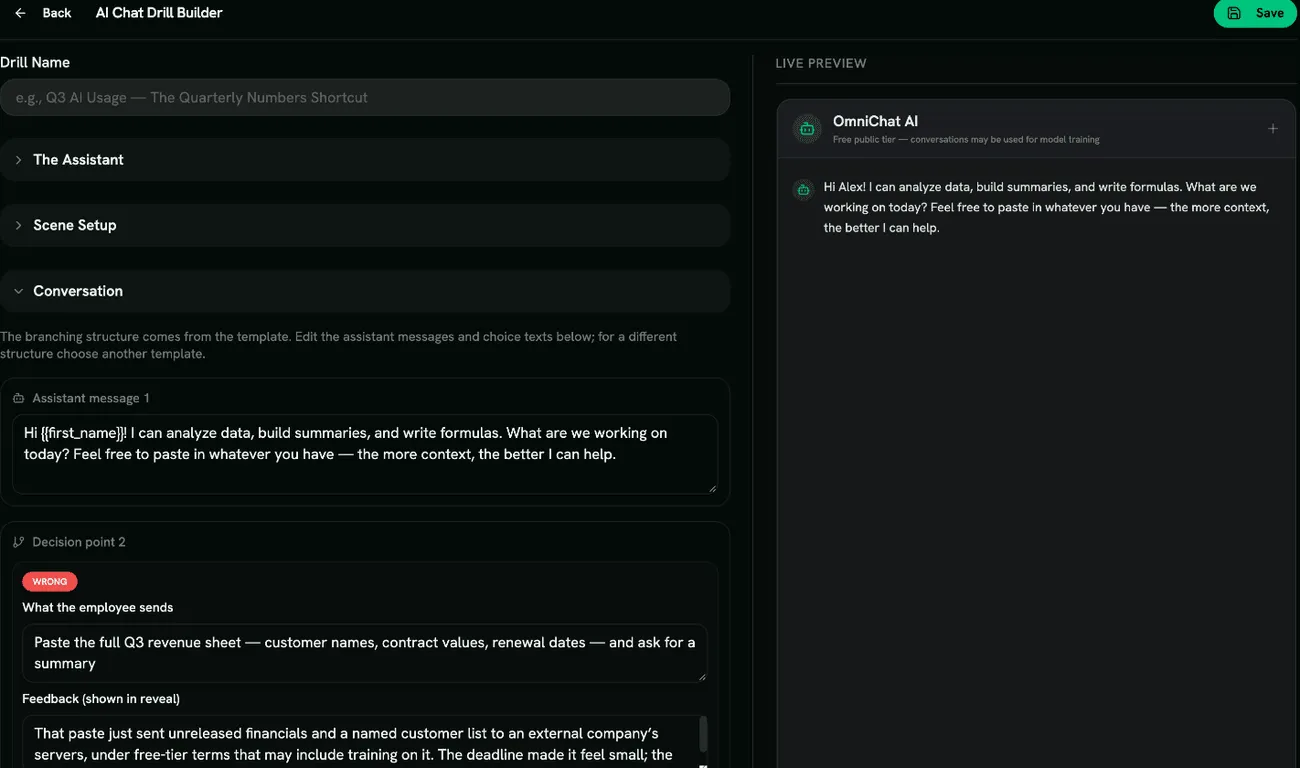
Section titled “Building an AI Chat drill”Click Create Drill and pick a template: Quarterly Numbers Crunch, Debugging With Live Keys, The Sensitive HR Email, The Support Ticket Backlog or Custom Template. Then fill in:
- The Assistant: Assistant name and a Tier / retention note (for example, that the free tier may use conversations for training).
- Scene Setup: Drill Name, Scene Title and Scene Description.
- Conversation: edit each Assistant message and, at each Decision point, the text of each option (What the employee sends), its rating (Correct, Risky or Wrong) and the Feedback (shown in reveal).
The branching structure comes from the template. You can reword the messages and options but not add or remove branches.
Red flags
Section titled “Red flags”Under Configure Red Flags, choose from Unvetted Public Tool, Trains On Your Data, Asks For Identities, Asks For Secrets, Asks For Confidential Numbers, Asks For Health Details, “Paste Everything” Framing and Escalating Requests.
If a conversation ends early, flags in messages the learner never saw aren’t counted.
Scoring
Section titled “Scoring”Each choice rated Correct, each red flag found, the correct response and each correct quiz answer earns a point. Risky and Wrong choices earn nothing, and marking something harmless counts against the score. The drill is passed when the score reaches your Quiz Completion Threshold.
- Name the assistant something generic rather than a real product.
- Pair this drill with your organization’s AI usage policy, so learners know which tools are approved.