
What is a learning path?
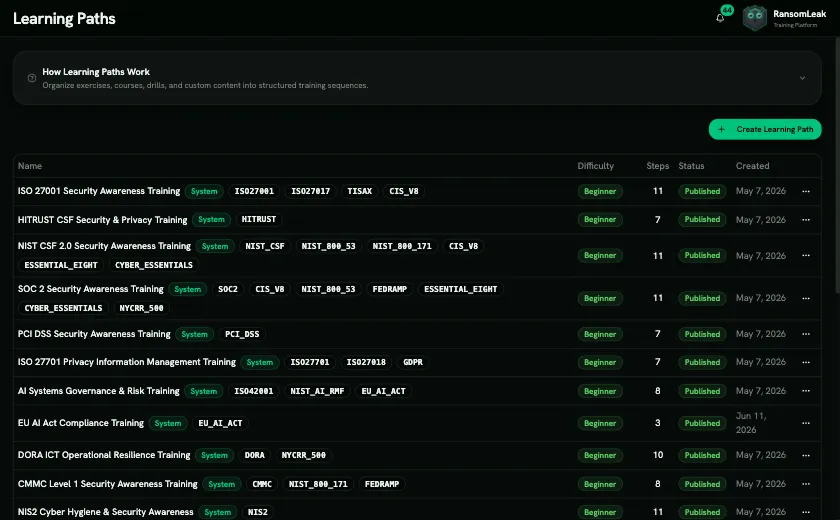
A learning path is a curriculum: a set of steps that learners work through, optionally in a required order. Use one for onboarding, for a compliance programme (for example ISO 27001 Security Awareness Training), or to go deep on a single threat.
What a path is made of
Section titled “What a path is made of”- Details: name, description, difficulty (Beginner, Intermediate or Advanced), estimated duration and skills.
- Content type: SAT (security awareness training) or AppSec (secure development). It decides which content you can add and which licence learners need, and it can’t be changed after the path is created.
- Steps, each of which is one of:
- an Exercise, which is one interactive scenario;
- a Course, which counts as complete when every exercise in it is complete;
- a Drill of any type (Phishing, Deepfake, Smishing, Chat, MFA, Vishing, QR Phishing, Fake Login, AI Chat, Attack Chain, OAuth Consent, Malicious Attachment, Social Media);
- Custom Content, meaning your own SCORM package or document.
- Prerequisites (optional): which steps must be done before a step unlocks. This is how you enforce an order.
- Optional steps: “bonus” steps that don’t count toward completion.
Two kinds of paths
Section titled “Two kinds of paths”| System paths | Your own paths | |
|---|---|---|
| Created by | RansomLeak | Your administrators |
| Editable | No, but you can clone one to get an editable copy | Yes |
| Compliance framework tags | Yes (SOC 2, ISO 27001, HIPAA, NIS2, DORA and more) | No |
| Can repeat every year | Yes | No |
The lifecycle
Section titled “The lifecycle”- Draft: you create the path and add steps. Learners can’t see it yet.
- Published: the path can be assigned, and if Catalogue is on, learners can find it themselves.
- In use: learners are enrolled and work through it. You follow their progress.
- Complete: a learner finishes every required step and receives a certificate.
Learning paths and campaigns
Section titled “Learning paths and campaigns”A learning path has no deadline of its own. When you need a due date, reminders and a completion report for a fixed group of people, put the path inside a campaign. The campaign supplies the dates; the path supplies the content. See Through a campaign.
Who can manage learning paths
Section titled “Who can manage learning paths”| Permission | Allows |
|---|---|
| View Learning Paths | Opening the list and the builder, read-only |
| Manage Learning Paths | Creating, editing, publishing, deleting; assigning and unassigning people; approving enrollment requests |
| Manage Custom Content | Uploading SCORM packages and documents to use as steps |
| Manage Campaigns | Adding a learning path to a campaign |
The built-in Admin role has all of these. Change roles under User Management → Roles & Permissions.