
Fake Login drills
A Fake Login drill picks up where a phishing email leaves off: the learner has already clicked a link and landed on a sign-in page. They inspect the page and mark what’s wrong before typing anything. The page is a simulation and never accepts input.
Fake Login drills are on the Fake Login Drills tab under Content Management → Microlearning. You need Manage Fake Login Drills.
What learners experience
Section titled “What learners experience”- Scene: a short setup explains the link they clicked.
- Inspection: the sign-in page appears in a browser window. They tap anything suspicious, such as the address bar, the padlock, the logo, a pre-filled email or the footer.
- Reveal: red flags found and missed, with explanations.
- Response: what to do next: close the page and report it, and what to do if a password was already typed.
- Quiz.
Building a Fake Login drill
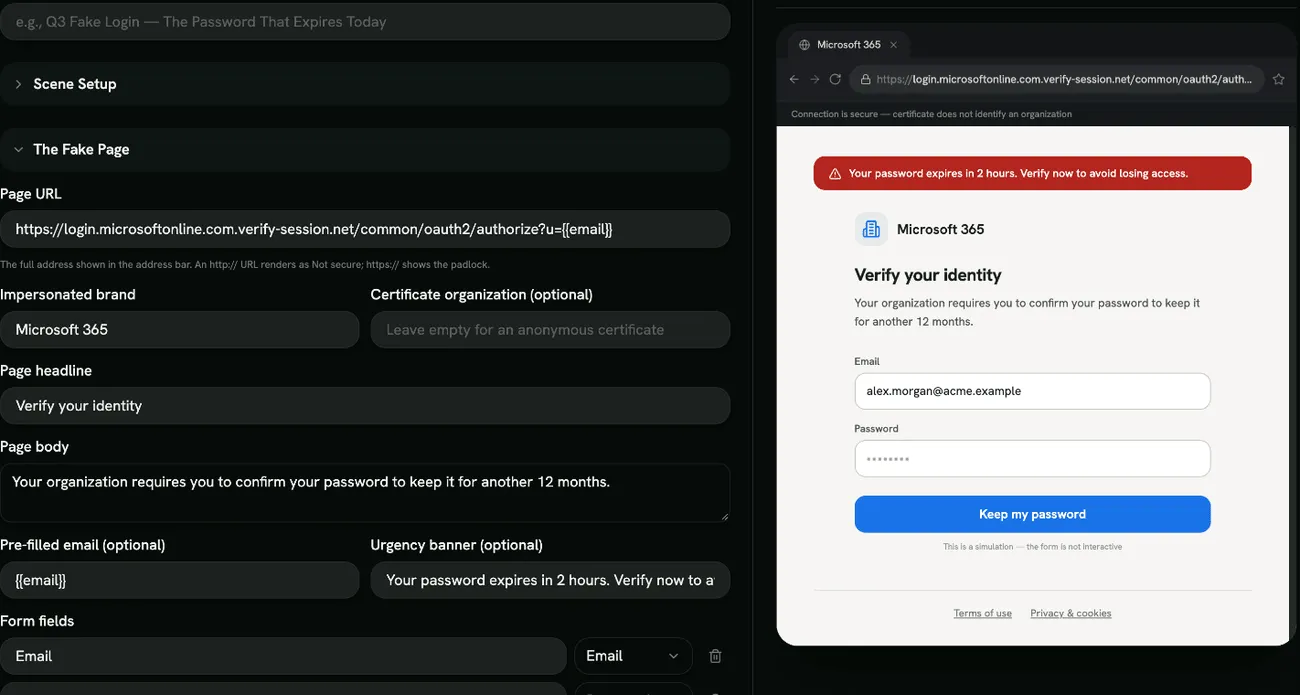
Section titled “Building a Fake Login drill”Click Create Drill and pick a template: Microsoft 365 Password Expiry, Company SSO Re-verification, DocuSign Document Waiting, Payroll Direct-Deposit Update or Custom Template. Then fill in:
- Scene Setup: Drill Name, Scene Title and Scene Description (the lure that brought the learner here).
- The Fake Page:
- Page URL: the full address shown in the address bar. An
http://address shows as Not secure. - Impersonated brand, Page headline and Page body.
- Certificate organization (optional): leave it empty for an anonymous certificate.
- Pre-filled email (optional) and Urgency banner (optional).
- Form fields (Email, Password or Text) and the Submit button label.
- Footer links (one per line).
- Page URL: the full address shown in the address bar. An
- Browser Skin: Chrome or Edge.
Red flags
Section titled “Red flags”Under Configure Red Flags, choose what the learner must find, for example Lookalike Domain, Brand-as-Subdomain Trick, Wrong Top-Level Domain, No HTTPS, Anonymous Certificate, Manufactured Urgency, Pre-filled Email, Password Behind an Emailed Link and Dead Footer Links.
Some flags need a matching detail on the page. For example, No HTTPS needs an http:// URL, and Pre-filled Email needs a pre-filled email. The builder tells you what to add first.
Scoring
Section titled “Scoring”Each red flag found, the correct response and each correct quiz answer earns a point. Marking something harmless counts against the score. The drill is passed when the score reaches your Quiz Completion Threshold. See Scoring.
- Use your own sign-in page as the model (your SSO provider, your intranet) so learners practise on what they really see.
- Combine a convincing page with one subtle flag, like a lookalike domain, rather than many obvious ones.