
OAuth Consent drills
An OAuth Consent drill shows the screen that appears when an app asks for access to someone’s account: “This app would like to read your mail. Allow or Cancel?” The screen itself is real Microsoft or Google, which is what makes the attack work. Clicking Allow gives the app access that keeps working after a password reset and doesn’t need MFA. In the drill nothing is actually granted.
OAuth Consent drills are on the OAuth Consent Drills tab under Content Management → Microlearning. You need Manage OAuth Consent Drills.
What learners experience
Section titled “What learners experience”- Scene: a short setup explains how they reached the consent screen.
- Inspection: the consent screen appears in a browser window. They tap anything suspicious: the app name, the publisher, each permission, the return address.
- Reveal: red flags found and missed, with explanations.
- Response: cancel and report, and why “I’ll revoke it later” is too late.
- Quiz.
Building an OAuth Consent drill
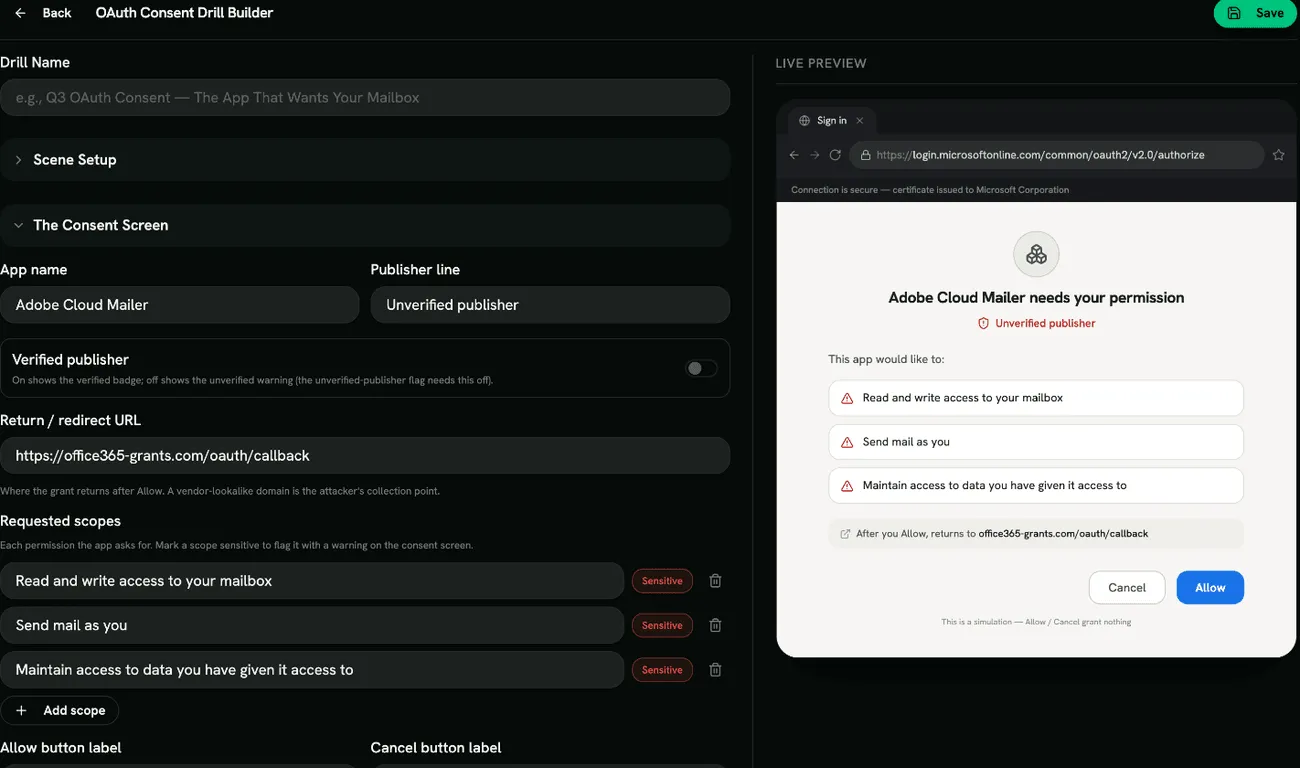
Section titled “Building an OAuth Consent drill”Click Create Drill and pick a template: Adobe Cloud Mailer — Mailbox Grant, HR Benefits Portal — Files Access, Microsoft Q&A — Sign In On Your Behalf, Productivity Add-in — Over-scoped or Custom Template. Then fill in:
- Scene Setup: Drill Name, Scene Title and Scene Description.
- The Consent Screen:
- App name and Publisher line.
- Verified publisher: on shows the verified badge, off shows the unverified warning.
- Return / redirect URL: where the grant goes after Allow.
- Requested scopes: each permission the app asks for. Tick Sensitive to show a warning next to it.
- Allow button label and Cancel button label.
- Identity Platform: Edge (Microsoft) or Chrome (Google).
Red flags
Section titled “Red flags”Under Configure Red Flags, choose from Unverified Publisher, Lookalike App Name, Consent Without a Login Step, Over-broad Scope, Scope / Purpose Mismatch, Offline Access (Refresh Token) and Lookalike Return URL.
Two items in the list are there to test judgement: Genuine Vendor Logo and Basic Sign-in Scope are normal, and a learner who marks them as suspicious loses points. Unverified Publisher needs Verified publisher turned off, and scope flags need at least one scope.
Scoring
Section titled “Scoring”Each red flag found, the correct response and each correct quiz answer earns a point. Marking something harmless counts against the score. The drill is passed when the score reaches your Quiz Completion Threshold.
- Match the identity platform to what your organization uses (Microsoft 365 or Google Workspace).
- Tell learners who to contact when they aren’t sure whether an app is approved.