
MFA drills
An MFA drill simulates push-bombing: a stream of sign-in approval prompts on the learner’s phone, sometimes with a text claiming to be from IT. The lesson is to deny every prompt they didn’t trigger, then report it.
MFA drills are on the MFA Drills tab under Content Management → Microlearning. You need Manage MFA Drills to create or edit them.
What learners experience
Section titled “What learners experience”- Scene: for example, asleep at 6 AM when the phone lights up. They click Pick up the phone.
- The bombing: prompts arrive one after another, and they tap Approve or Deny on each. Approving ends the run: the attacker is in.
- Review: they mark what was suspicious in the notifications.
- Reveal: red flags found and missed, and what each Approve or Deny meant.
- Response: denying isn’t enough; the right next step is to report it and change the password.
- Knowledge Check: the quiz.
Create an MFA drill
Section titled “Create an MFA drill”Click Create Drill, enter a Drill Name and Choose Template: The 6 AM Login Storm, The “MFA System Test”, Mailbox at Midnight, The Stray Workday Prompt, or Custom Template.
Then edit:
- Scene Setup: Scene Title and Scene Description.
- Bombing Sequence: for each push prompt, the App name, Notification text, Location / device line, and the Feedback if approved and Feedback if denied. For each pressure text, the Sender shown on the phone and the Message text.
- Configure Red Flags: Prompt You Didn’t Trigger, Unfamiliar Location / Device, Prompt After Prompt, Odd-Hours Timing, “IT” Asking You to Approve and Text From an Unknown Number. The last two need a pressure text in the sequence.
- Phone Skin: iPhone or Android.
- Quiz Questions.
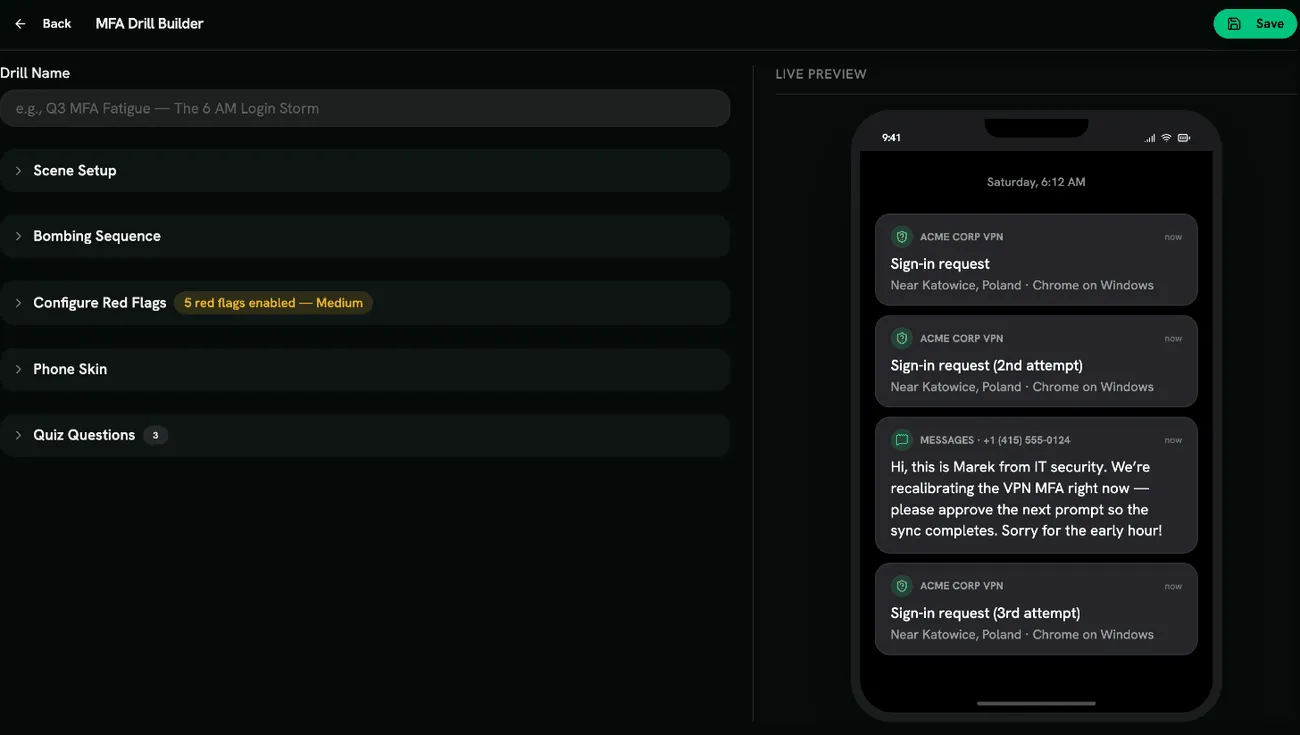
The order of prompts and texts comes from the template. You can change the wording, not the structure.
Scoring
Section titled “Scoring”Scored like other drills: decisions, red flags found, the response and quiz answers each earn points. See Scoring.
- Odd-hours scenarios hit hardest: people approve to make the noise stop.
- Pair this drill with your real reporting process, so learners know who to tell.