
Feedback and security events
Exercise Feedback
Section titled “Exercise Feedback”After an exercise, learners are asked How was this exercise? and can rate it from Terrible to Loved it, with an optional comment.
Feedback → Exercise Feedback lists every response. Filter by exercise, user, campaign, rating and date. Export CSV downloads the filtered list (up to 50,000 rows).
General Feedback
Section titled “General Feedback”Learners can send general feedback at any time from the user menu (Feedback). It appears under Feedback → General Feedback, filterable by user and date.
Security Events
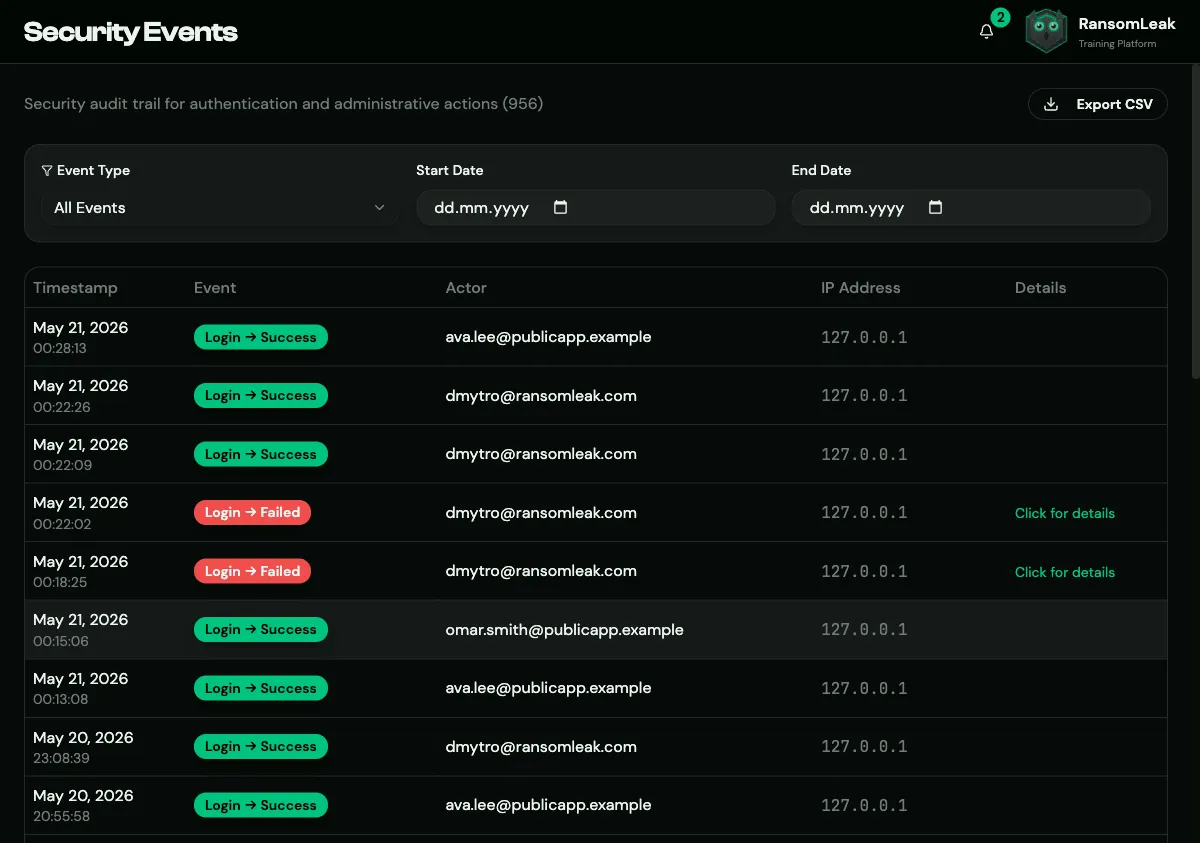
Section titled “Security Events”Security Events is the audit trail for sign-ins and administrative actions. It includes:
- sign-ins, failed sign-ins, MFA events and account lockouts;
- password changes;
- users created, changed or deleted, and role changes;
- invitations and licence assignments;
- API tokens;
- settings changes;
- blocked IP addresses;
- SCIM provisioning events.
Filter by Event Type and dates, and click a row for details: who did it, to whom, from which IP address and browser, and which fields changed. Export CSV downloads the filtered list.