
GitHub secure-coding lessons
RansomLeak can comment on a GitHub pull request with a link to a short secure-coding lesson when a scanner reports a weakness on it. It is free, needs no RansomLeak account and is not part of your RansomLeak organization’s settings. There are two ways to use it.
| GitHub App | GitHub Action | |
|---|---|---|
| Reads | GitHub code scanning alerts | A SARIF file from your scanner |
| Private repositories | Only with GitHub Code Security | Yes, without Code Security |
| Records completion on the pull request | Yes | Only if the App is also installed |
| Fork pull requests | Not currently supported | Not currently supported |
GitHub App
Section titled “GitHub App”Install RansomLeak Secure Coding from GitHub Marketplace on your account or organization. There is nothing to configure.
It needs GitHub code scanning to be running: public repositories, or private repositories with GitHub Code Security. Without either, the App has nothing to read, so use the Action.
When code scanning flags a type of issue we have a lesson for, the App adds one comment to the pull request and keeps editing that same comment. It lists up to five lessons, one for each distinct issue type, each taking 5-10 minutes. The App also sets a check named RansomLeak Secure Coding. When someone finishes a lesson, the App ticks it in the comment.
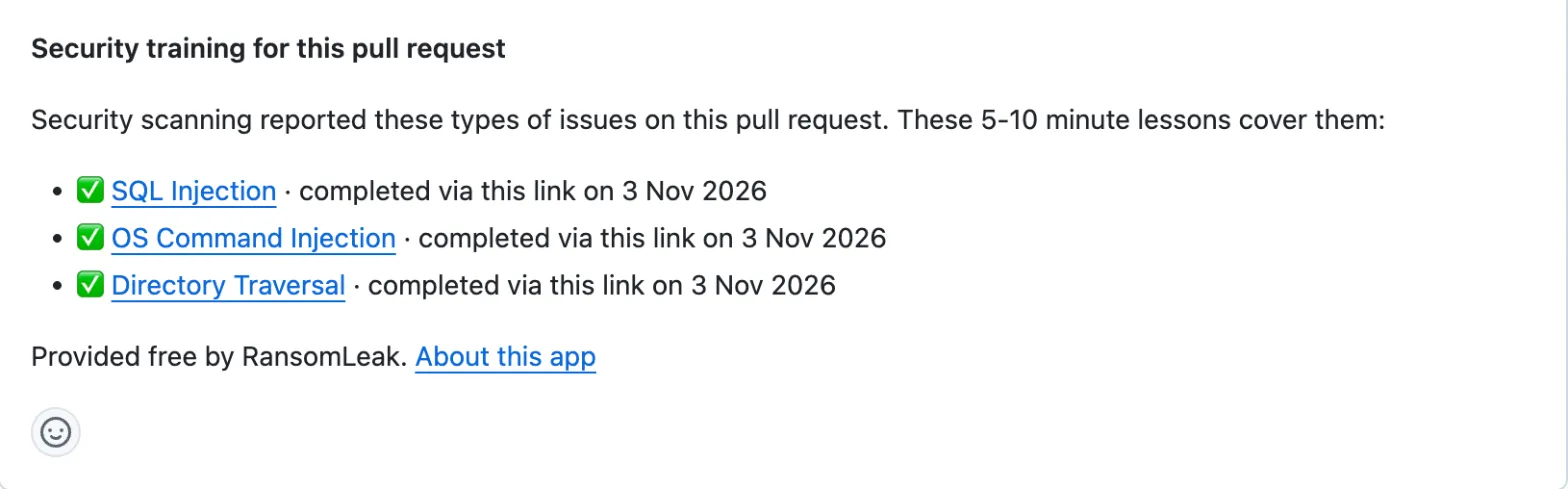
The check is neutral when the comment is created and success when all listed lessons are finished. It never fails.

Don’t make this check required: pull requests without lessons never report it.
Fixing the code does not remove the lesson from the comment.
GitHub Action
Section titled “GitHub Action”Add the Action to a workflow that already runs a scanner and writes SARIF. It works with CodeQL, Semgrep, Trivy, Gitleaks and other tools whose rules carry a CWE, a CVE or a GHSA, and with secrets scanners.
permissions:  contents: read  pull-requests: write  id-token: write
steps:  - uses: actions/checkout@v4  # run your scanner and write results.sarif  - uses: ransomleak/secure-coding-action@v1    with:      sarif: results.sarif
You don’t sign up or add a secret. id-token: write lets the Action prove to RansomLeak which repository it runs in.
The comment reflects what your scanner reports, so run it on changed files or with a baseline for less noise. When a SARIF result has a baselineState, only new and updated results count.
Use the default GITHUB_TOKEN for the github-token input. If you pass a token that belongs to a different identity, the comment is posted as that identity and every rerun creates a new comment instead of updating the first.
The Action never fails your workflow. If RansomLeak can’t be reached, or the SARIF file is missing or invalid, it logs a warning and carries on. Pull requests from forks are not currently supported, because GitHub gives those runs a read-only token and no OIDC token.
Without the App, the Action can’t tick the comment or set a check. Install the App as well to record completion on the pull request. If the App is installed for the account, it posts the comment and the Action adds nothing. A pull request that started with the Action and then gets the App, or the reverse, can show a second comment.
What’s covered
Section titled “What’s covered”- SQL injection
- Cross-site scripting (XSS)
- Path traversal
- Command injection
- Server-side request forgery (SSRF)
- Hard-coded secrets
- XML external entities (XXE)
- Open redirect
- Cross-site request forgery (CSRF)
- Vulnerable dependencies
Deserialization and weak cryptography have no lesson yet.
A finding matches on its CWE. Findings from secrets scanners and dependency advisories match on the scanner type. OWASP categories and broad parent CWEs such as CWE-200 are not used, because they don’t point to one specific lesson.
What data is sent
Section titled “What data is sent”The App reads the code scanning alert and the pull request’s state, and whether its author is a bot. The Action sends only identifiers: the scanner name, the CWE ids of the rules that produced a result, whether a rule is a CVE or GHSA advisory, and the pull request number. The repository and owner come from GitHub’s OIDC token.
Each lesson link holds a token with the repository owner name, which is a username for personal repositories, the repository name, the pull request number, the lesson and internal ids. A finished lesson needs them to reach the right pull request. The token is signed, not encrypted, so anyone with the link can decode it and read those values.
No source code, file paths or snippets are sent. RansomLeak keeps no per-developer record. Uninstalling the App deletes its installation record. If you use only the Action, RansomLeak keeps one owner record holding only a numeric GitHub account id, and support removes it on request. See the privacy policy.
Completion is not verified
Section titled “Completion is not verified”The lesson link belongs to the pull request, not to a person. Anyone who can open the pull request can open the link and mark the lesson finished. On a public repository that means anyone at all.
A tick means the lesson was completed via that link. Use it as a nudge, not as proof of who did the training.
Limits
Section titled “Limits”- Lessons are in English.
- The App works with github.com only.
- Pull requests from forks are not currently supported.
- A lesson shows only when a scanner’s finding maps to one. Findings with no matching lesson get no comment, including findings with only an OWASP category.